

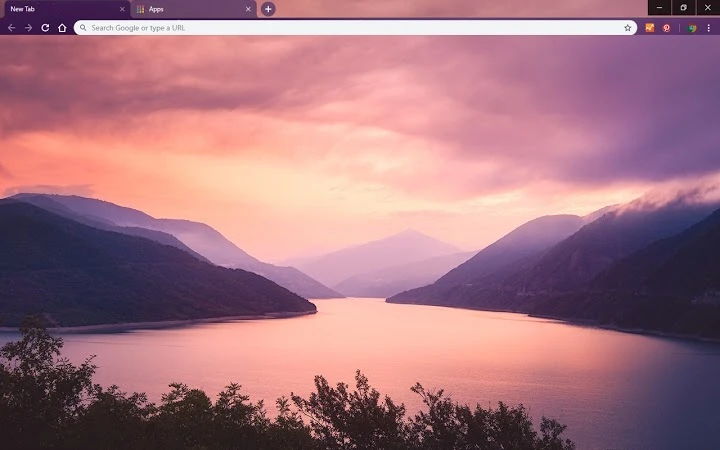
Description
Elegant Desktop Theme for Windows & Mac
Overview
The Zhinvali Sunrise Theme is a visually striking desktop customization tool designed for users seeking a refined aesthetic on their Windows and Mac systems. Developed by Chromethemer, this theme enhances the visual experience by introducing a warm, sunrise-inspired color palette that transforms the interface. It serves as a digital canvas for users who value personalization and visual harmony in their daily computing environment. Ideal for professionals, creatives, and casual users alike, the theme offers a subtle yet impactful way to refresh the look of their desktop without altering functionality.
Real-world usage scenarios include setting a calming morning ambiance for remote work, enhancing focus through visual consistency, or simply adding a touch of personal style to a shared or corporate machine. The theme is part of a broader collection available on the developer’s website, where users can explore additional designs and related wallpapers. While the theme itself does not include interactive features, its purpose lies in aesthetic enhancement, making it suitable for those who prioritize visual appeal over technical utility.
Key Features & Capabilities
- Sunrise-Inspired Visual Design – The theme features a gradient palette inspired by a morning sunrise, blending soft oranges, pinks, and golds to create a serene and uplifting interface.
- Cross-Platform Compatibility – Available for both Windows and Mac systems, allowing consistent customization across different operating environments.
- Lightweight Installation – At just 1.2 MB, the theme requires minimal storage space and can be applied quickly without system strain.
- Seamless Integration with Desktop Environment – Designed to work smoothly with the native UI elements, ensuring a cohesive and polished appearance.
- Complementary Wallpapers – Access to downloadable wallpapers that match the theme’s color scheme, enhancing the overall visual experience.
Users can apply the theme to create a consistent visual mood, such as setting a morning routine on their work computer or personalizing a creative workspace. The theme’s simplicity ensures it does not interfere with system performance or workflow efficiency, making it ideal for users who want a polished look without complexity.
User Interface, Workflow & Performance
The Zhinvali Sunrise Theme does not include a traditional user interface, as it is a visual customization package rather than a functional application. Instead, users apply the theme through their system’s theme settings or via the Chromethemer platform. The workflow is straightforward: download the theme file, open the system’s appearance settings, and select the theme from the available options. This process is consistent across both Windows and Mac platforms.
Since the theme is purely visual and does not execute background processes, it does not consume significant system resources. The developer did not specify resource usage details, but based on its file size and nature, it is expected to operate efficiently with no noticeable impact on CPU or RAM. Stability is inherent to the design, as the theme does not introduce additional software components or dependencies. No performance issues were reported in the provided information, and the lightweight nature of the file suggests reliable operation across a range of hardware configurations.
Compatibility & System Requirements
The Zhinvali Sunrise Theme is compatible with both Windows and Mac operating systems. Specific version numbers were not provided, but it is designed to work with current and recent releases of these platforms. The installation size is 1.2 MB, which is minimal and suitable for systems with limited storage.
Exact system requirements were not listed. The developer did not provide detailed hardware specifications, so users should ensure their system supports theme customization features. Compatibility information is limited to the operating systems mentioned. No additional dependencies or third-party tools are required for installation or operation.
Pros and Cons
Pros
- Visually appealing, sunrise-themed design enhances desktop aesthetics
- Lightweight at only 1.2 MB, minimal system impact
- Available for both Windows and Mac, broad platform support
- Complements desktop wallpapers for a unified look
- Free to download and use with no hidden costs
Cons
- No interactive or functional features beyond visual customization
- Compatibility with older OS versions is not confirmed
- Limited to visual changes; does not alter application behavior
- Additional content (wallpapers) requires visiting the developer’s site
- Does not include automatic update notifications
FAQ Section
Is the Zhinvali Sunrise Theme free to use?
Yes, the theme is available at no cost. There are no subscription fees or in-app purchases required to download or apply it.
Can I use this theme on both Windows and Mac?
Yes, the theme is designed for both Windows and Mac operating systems, allowing users to maintain a consistent look across devices.
Does this theme affect system performance?
As a visual theme with no background processes, it does not impact system performance. The developer did not specify resource usage, but its small file size suggests minimal impact.
How do I install the theme?
Download the theme file from the official source, then apply it through your system’s appearance or theme settings. The process is simple and does not require technical expertise.
Are updates automatically delivered?
Automatic updates are not mentioned in the provided information. Users may need to manually check the developer’s website for new versions or additions.
Final Thoughts
The Zhinvali Sunrise Theme offers a beautiful, lightweight way to personalize your desktop environment on Windows or Mac. While it serves a single purpose—visual enhancement—it does so effectively and without overhead. Its warm, uplifting design makes it ideal for users who want to create a more inviting workspace. The free availability and cross-platform support further strengthen its appeal. For those seeking a simple, elegant touch to their digital experience, this theme delivers on its promise. Download Zhinvali Sunrise Theme now.
Guides & Tutorials for Zhinvali Sunrise Theme for Chrome
How to install Zhinvali Sunrise Theme for Chrome
- Click the Preview / Download button above.
- Once redirected, accept the terms and click Install.
- Wait for the Zhinvali Sunrise Theme for Chrome download to finish on your device.
How to use Zhinvali Sunrise Theme for Chrome
This software is primarily used for its core features described above. Open the app after installation to explore its capabilities.
User Reviews for Zhinvali Sunrise Theme for Chrome 0
No reviews found





